1文件 I/O
COMS W3157
Borowski 博士
1 输入 / 输出
- 在 C 语言中,有许多获取输入和输出的方法。
- 我们可以从/向标准输入、标准输出、标准错误和文件进行输入/输出。
- 我们已经见过 printf() 和 scanf() 的使用,但还有更多!
- 我们将在此幻灯片中逐一介绍它们。
2 getopt (现在在 C 中!)
```
int getopt(int argc, char *argv[],
char *optstring);
```
- 与 argv 配合使用,以系统的方式解析命令行参数。
- 库中声明了以下变量,可在您的 C 程序中使用:
- opterr
- optopt
- optind
- optarg
3 getopt (现在在 C 中!)
- 将 opterr 设置为 0 会禁用 getopt 默认向标准错误打印错误。
- 类似于 bash 中的 getopt,C 语言的 getopt 使用一个名为 optind 的索引变量一次解析一个命令行参数。optind 指向要处理的下一个参数。
- 成功时,getopt 返回它读取的字符;当没有选项字符剩余时,getopt 返回 -1。
4 getopt (现在在 C 中!)
- 成功读取提供给 getopts 的下一个选项后,一个名为 optarg 的外部变量会设置为相应的参数。也就是说,当读取 ./ex -a arg1 中的 -a 时,optarg 将被设置为 "arg1"。
- 成功读取选项后,一个名为 optopt 的外部变量会设置为所读取选项的 ASCII 值。(在上述示例中,optopt 等于 'a'。)
5 getopt 示例
```
int main(int argc, char **argv) {
bool aflag = false,
bflag = false;
char *cvalue = NULL;
int c;
// Suppress internal error messages.
opterr = 0;
while ((c = getopt(argc, argv, "abc:")) != -1) {
switch (c) {
case 'a':
aflag = true;
break;
case 'b':
bflag = true;
break;
case 'c':
cvalue = optarg;
break;
case '?':
fprintf(stderr,
"Error: Unknown option '-%c' received.\n",
optopt);
return EXIT_FAILURE;
default:
return EXIT_FAILURE;
}
}
```
```
printf("aflag = %d, bflag = %d, cvalue = %s\n",
aflag, bflag, cvalue);
printf("optind is now %d.\n", optind);
for (int index = optind; index < argc; index++) {
printf("Non-option argument: %s\n",
argv[index]);
}
return EXIT_SUCCESS;
```
6 getchar
最简单的机制是每次从标准输入读取一个字符。
- int getchar(void) 每次调用时返回下一个输入字符,或在遇到文件结束时返回 EOF。
- 符号常量 EOF 在 <stdio.h> 中定义。该值通常为 -1,但测试应以 EOF 的形式编写,以便独立于特定值。
7 putchar
int putchar(int) 用于输出。
- putchar(c) 将字符 c 放到标准输出,默认是屏幕。
- putchar 返回写入的字符,如果发生错误则返回 EOF。
8 getchar/putchar 示例
```
#include
#include
/ lower: convert input to lower case/
int main() {
int c;
while ((c = getchar()) != EOF) {
putchar(tolower(c));
}
return 0;
}
From
```
9 scanf
```
int scanf(char *format, ...)
```
scanf 从标准输入读取字符,根据 format 中的规范解释它们,并通过其余参数存储结果。
scanf 在其 format 字符串中忽略空格和制表符。此外,它在查找输入值时会跳过空白字符(空格、制表符、换行符等)。
要读取格式不固定的输入,通常最好一次读取一行,然后用 scanf 拆分它。
最常见的格式说明符是用于 int 类型的 "\%d"、float 类型的 "\%f" 和 字符字符串 类型的 "\%s"。
示例:
```
int day, month, year;
scanf("%d/%d/%d", &month, &day, &year);
```
它返回成功匹配并分配的输入项的数量作为其值。
10 sscanf
还有一个 sscanf 函数,它从字符串而不是标准输入读取:
int sscanf(char string, char format, arg1, arg2, ...)
它根据 format 中的格式扫描字符串,并通过 arg1、arg2 等存储结果值。这些参数必须是指针。
format 字符串通常包含 转换规范,用于控制输入的转换。format 字符串可能包含:
- 空格或制表符,它们不会被忽略。
- 普通字符(非 \%),它们应该与输入流的下一个非空白字符匹配。
- 转换规范,由字符 \%、可选的 赋值抑制字符 *、可选的指定最大 字段宽度 的数字、可选的 h、l 或 L 指示目标宽度,以及一个 转换字符 组成。
它返回成功匹配并分配的输入项的数量作为其值。
11 行输入
```
char fgets(char line, int maxline,
FILE *fp)
```
fgets 从文件 fp 读取下一行输入(包括换行符)到字符数组 line 中;最多读取 maxline-1 个字符。
生成的行以 '\0' 终止。
fgets 返回 line;在文件结束或错误时返回 NULL。
12 文件访问
FILE *fp 称为 文件指针,它指向一个包含文件信息的结构体。此信息包括 缓冲区 的位置、缓冲区 中的当前字符位置、文件是正在读取还是写入、以及是否发生错误或文件结束。
- 用户无需知道详细信息。
- 需要做的是打开文件、读取/写入/追加数据,最后关闭文件。
13 打开文件
FILE fopen (char name, char *mode)
file open 接受包含文件名的 字符字符串 和打开文件的模式。mode 可以是
- "r" 用于读取
- "w" 用于写入
- "a" 用于追加
在某些系统上,如果您希望处理 二进制文件(即数据不仅仅是文本),您可以在模式字符串中添加字母 "b",例如 "rb"、"wb" 和 "ab"。
14 关闭文件
```
int fclose(FILE *fp)
```
是 fopen 的反向操作,因为它断开了文件指针与 fopen 建立的外部名称之间的连接,释放文件指针以用于另一个文件。
- 完成文件操作后调用它,因为操作系统对打开文件的数量有限制。
- 它会刷新输出 缓冲区。
15 从文件读取/写入文件
从文件读取/写入文件对于允许我们的程序处理不同类型的输入和输出至关重要。
有许多函数可以实现这一点,但最重要的是以下几个:
- 单字符文件读写:getc ( ) , putc ( )
- 多字节文件读写:fread(), fwrite()
- 文件定位:fseek (), ftell(), etc.
16 单字符文件读写
int getc(FILE *fp)
返回由 fp 引用的流中的下一个字符;在文件结束或错误时返回 EOF。
int putc(int c, FILE *fp)
将字符 c 写入文件 fp,并返回写入的字符,如果发生错误则返回 EOF。
17 getc() 和 putc() 示例
```
#include
#include
/ lower: convert input to lower case/
int main() {
int c;
while ((c = getc(stdin)) != EOF) {
putc(tolower(c), stdout);
}
return 0;
}
```
18 多字节文件读写
```
size_t fread(void p, size_t size, size_t n, FILE file)
```
- 从文件读取 n 个对象,每个对象 size 字节长,到 p 指向的内存位置。
- 返回成功读取的对象数量,可能少于请求的数量 n。在这种情况下,使用 feof() 和 ferror() 来确定状态。
```
size_t fwrite(const void *p, size_t size, size_t n, FILE
```
*file)
- 将 n 个对象,每个对象 size 字节长,从 p 指向的内存位置写入文件。
- 返回成功写入的对象数量,如果发生错误,将少于 n。
19 fread() 和 fwrite() 示例
```
int array[10] = {0, 1, 2, 3, 4, 5, 6, 7, 8, 9};
FILE *fp = fopen("binary.dat", "wb");
for (int i = 0, end = sizeof(array)/sizeof(int); i < end; i++) {
fwrite(array + i, sizeof(int), 1, fp);
}
fclose(fp);
int num = 0;
fp = fopen("binary.dat", "rb");
while(fread(&num, sizeof(int), 1, fp) == 1) {
printf("%d\n", num);
}
fclose(fp);
```
20 文件定位函数
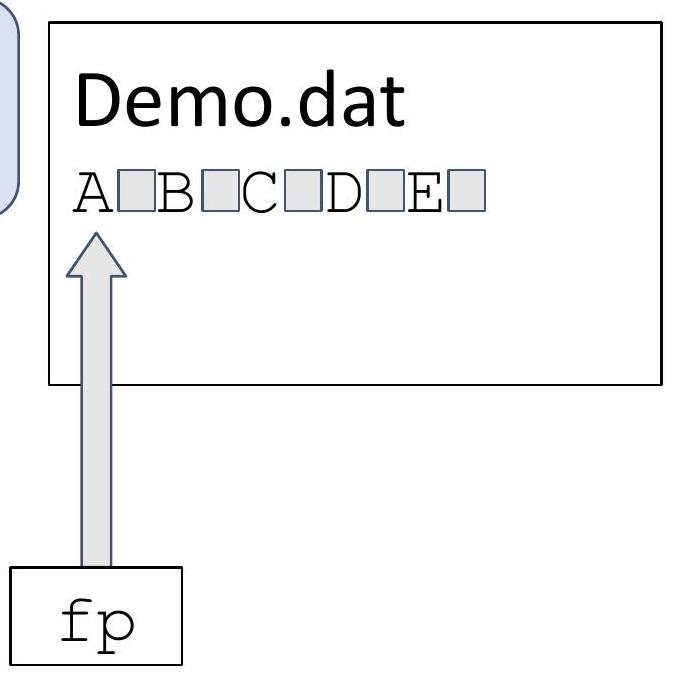
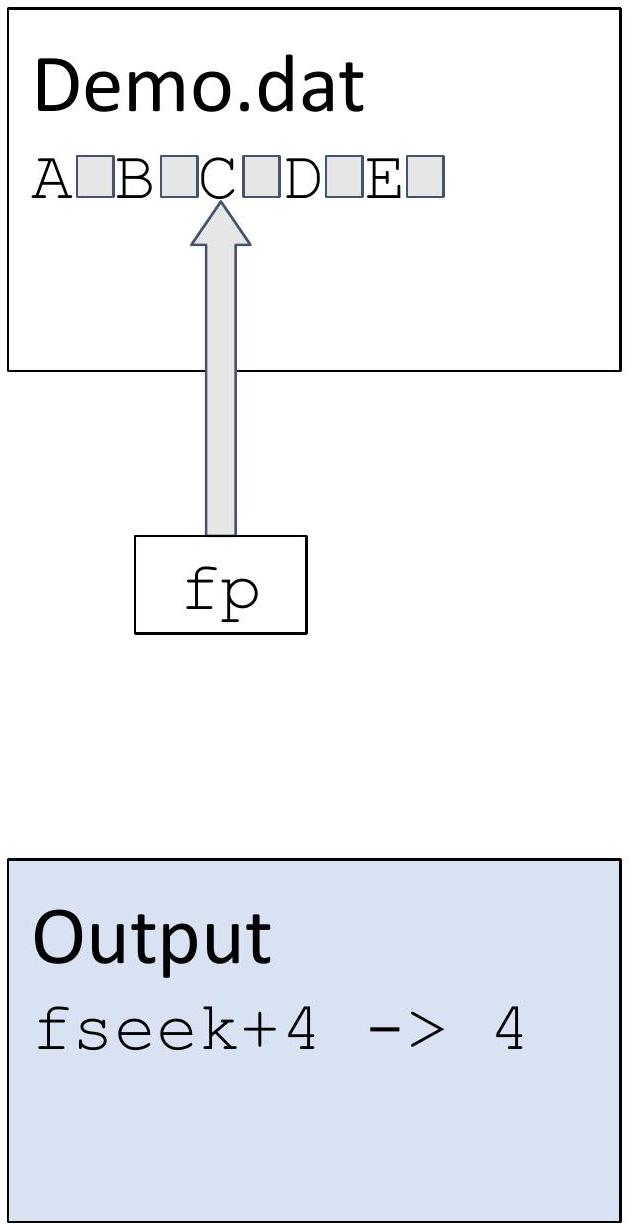
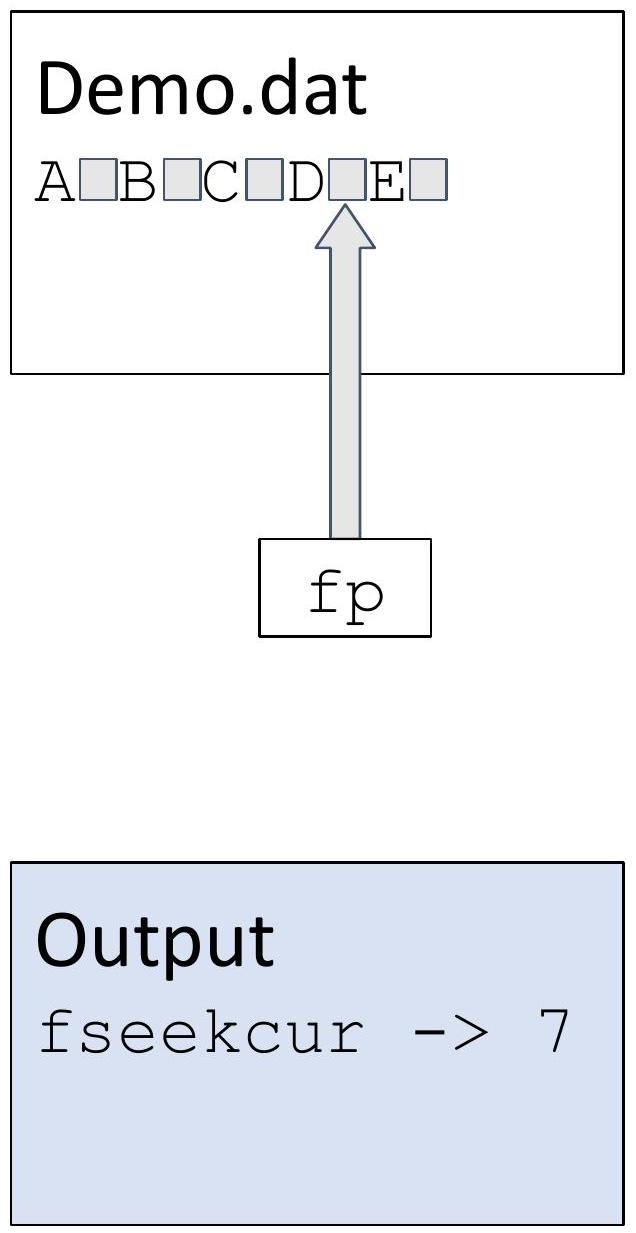
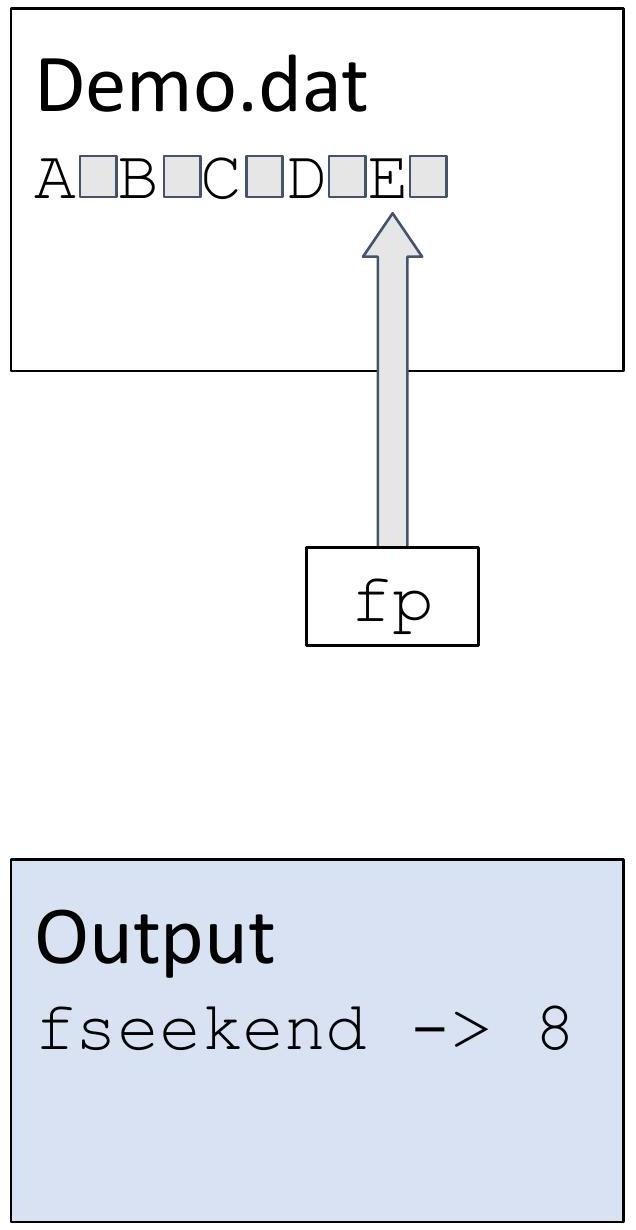
- int fseek(FILE *stream, long offset, int origin) fseek 设置流的文件位置;
随后的读取或写入将从新位置开始访问数据。对于 二进制文件,位置设置为从 origin 偏移的字符数,origin 可以是 SEEK_SET(开头)、SEEK_CUR(当前位置)或 SEEK_END(文件末尾)。
对于 文本流,offset 必须为零,或者由 ftell 返回的值(在这种情况下 origin 必须是 SEEK_SET)。fseek 在错误时返回非零。
- long ftell(FILE *stream)
ftell 返回流的当前文件位置,或在错误时返回 -1。
- void rewind(FILE *stream)
rewind(fp) 等同于 fseek(fp, OL, SEEK_SET); clearerr(fp);
21 文件定位示例
```
#include
int main(void) {
Open a text file for update (reading and writing), first truncating the file to zero length if it exists or creating the file if it does not exist.
```
```
FILE *fp = fopen("demo.dat", "w+");
for (char ch = 'A'; ch <= 'E'; ch++) {
putc(ch, fp);
putc(' ', fp);
}
fflush(fp);
rewind(fp);
printf("rewind -> %ld \n", ftell(fp))
```
```
}
```
```
Output
rewind -> 0
```
22 文件定位示例
```
#include
int main(void) {
FILE *fp = fopen("demo.dat", "w+");
for (char ch = 'A'; ch <= 'E'; ch++) {
putc(ch, fp);
putc(' ', fp);
}
fflush(fp);
rewind(fp);
fseek(fp, 4, SEEK_SET);
printf("fseek+4 -> %ld\n", ftell(fp))
}
```
23 文件定位示例
```
#include
int main(void) {
FILE *fp = fopen("demo.dat", "w+");
for (char ch = 'A'; ch <= 'E'; ch++) {
putc(ch, fp);
putc(' ', fp);
}
fflush(fp);
rewind(fp);
fseek(fp, 4, SEEK_SET);
fseek(fp, 3, SEEK_CUR);
printf("fseekcur -> %ld\n", ftell(fp))
}
```
24 文件定位示例
```
#include
int main(void) {
FILE *fp = fopen("demo.dat", "w+");
for (char ch = 'A'; ch <= 'E'; ch++) {
putc(ch, fp);
putc(' ', fp);
}
fflush(fp);
rewind(fp);
fseek(fp, 4, SEEK_SET);
fseek(fp, 3, SEEK_CUR);
fseek(fp, -2, SEEK_END);
printf("fseekend -> %ld\n", ftell(fp))
}
```
25 文件定位示例
```
#include
int main(void) {
FILE *fp = fopen("demo.dat", "w+");
for (char ch = 'A'; ch <= 'E'; ch++) {
putc(ch, fp);
putc(' ', fp);
}
fflush(fp);
rewind(fp);
fseek(fp, 4, SEEK_SET);
fseek(fp, 3, SEEK_CUR);
fseek(fp, -2, SEEK_END);
rewind(fp);
printf("rewind -> %ld\n", ftell(fp));
}
```
| Demo.dat |
| :--- |
| $\mathrm{A} \square \mathrm{B} \square \mathrm{C} \square \mathrm{D} \square \mathrm{E} \square$ |
| fp |
| 输出
rewind $->0$ |
26 I/O 的 系统调用
本幻灯片中描述的所有函数都属于 标准 C 库。
它们是围绕 系统调用 的 包装器。
系统调用 是一种 计算机程序 从其执行所在的 操作系统 内核 请求服务的 程序化 方式。
系统调用 是进入 内核代码 的唯一入口点,并在 内核模式 下执行(而不是 用户模式)。
27 文件描述符
文件描述符 是一个非负整数。当我们打开一个现有文件或创建一个新文件时,内核 会向进程返回一个 文件描述符。
0 是 标准输入 (stdin),1 是 标准输出 (stdout),2 是 标准错误 (stderr)。
使用 系统调用 时,我们应该使用符合 POSIX 标准的符号常量 STDIN_FILENO、STDOUT_FILENO 和 STDERR_FILENO,而不是 0, 1, 2,以提高代码的可读性。(stdin、stdout、stderr 不起作用。)
28 打开文件
可以使用以下方式打开文件:
```
#include
int open(const char path, int oflag, ... / mode_t mode */ );
```
path 是要打开或创建的文件名。
oflag 参数可以是:
- O_RDONLY 只读打开。
- O_WRONLY 只写打开。
- O_RDWR 读写打开。
- O_APPEND 每次写入时追加到文件末尾
- O_CREAT 如果文件不存在则创建。
- O_TRUNC 如果文件存在且成功打开用于只写或读写,则将其长度截断为 0。
Oflags 可以通过 按位或 组合,例如:O_WRONLY | O_CREAT | O_TRUNC(还有其他我们在此课程中不会使用的常量。请参阅 APUE,第 63 页)
29 关闭文件
```
#include
int close(int fd);
```
通过调用 close 函数来关闭打开的文件。关闭文件还会释放进程可能在该文件上持有的任何 记录锁。
30 从文件读取/写入文件
```
#include
ssize_t read(int fd, void *buf, size_t nbytes);
返回:读取的字节数,如果文件结束则为 0,错误时为 -1
#include
ssize_t write(int fd, const void *buf, size_t nbytes);
返回:如果成功写入的字节数,错误时为 -1
```
31 读取/写入示例
```
#define BUFSIZE 4096
int main(void) {
int n;
char buf[BUFSIZE];
while ((n = read(STDIN_FILENO, buf, BUFSIZE)) > 0) {
if (write(STDOUT_FILENO, buf, n) != n) {
fprintf(stderr, "Write error.\n");
}
}
if (n < 0) {
fprintf(stderr, "Read error.\n");
}
return 0;
}
```
32 读取目录内容
```
#include
struct dirent readdir(DIR dirp);
```
readdir() 函数返回一个指向 dirent 结构体的指针,该结构体表示由 dirp 指向的目录流中的下一个目录项。
在达到目录流末尾或发生错误时返回 NULL。
dirent 结构体的定义如下:
```
struct dirent {
ino_t d_ino; / Inode number /
off_t d_off; / Not an offset; see below /
unsigned short d_reclen; / Length of this record /
unsigned char d_type; /* Type of file; not supported
by all filesystem types */
char d_name[256]; / Null-terminated filename /
};
```
33 文件内容的 状态查询
- 有时,我们需要访问有关文件的信息,而不想浪费资源打开和关闭文件。
- 这时我们可以使用 stat () 系列函数来收集文件的 元数据 和信息。
- 有 3 个重要的函数可以“状态查询”文件的详细信息:stat()、lstat()、fstat()
- 这些函数返回一个 stat 结构体,其中包含有关正在“状态查询”的文件的 数据。
出于本课程的目的,我们将重点关注 stat() 和 lstat()
34 stat 结构体
```
struct stat {
dev_t st_dev; / ID of device containing file /
ino_t st_ino; / Inode number /
mode_t st_mode; / File type and mode /
nlink_t st_nlink; / Number of hard links /
uid_t st_uid; / User ID of owner /
gid_t st_gid; / Group ID of owner /
dev_t st_rdev; / Device ID (if special file) /
off_t st_size; / Total size, in bytes /
blksize_t st_blksize; / Block size for filesystem I/O /
blkcnt_t st_blocks; / Number of 512 B blocks allocated /
struct timespec st_atim; / Time of last access /
struct timespec st_mtim; / Time of last modification /
struct timespec st_ctim; / Time of last status change /
};
```
35 使用 stat() 和 lstat()
int stat(char path, struct stat buf);
- stat 接受一个字符串作为文件路径和一个指向 stat 缓冲区 的指针作为参数。指定文件的相关信息存储在提供的 buf 中。
- lstat 几乎相同,除了当 lstat 收到 符号链接 时,它分析 链接,而当 stat 收到 符号链接 时,它分析相应的文件。
36 stat() 示例
这是一个代码片段,用于打印名为 "example.txt" 的文件的 用户 ID:
```
struct stat filestat;
stat("example.txt", &filestat);
printf("%d\n", filestat.st_uid);
```
37 lstat() 示例
这是一个代码片段,用于打印指向 "example.txt" 的 符号链接 的 用户 ID:
```
struct stat lfilestat;
lstat("symlink", &lfilestat);
printf("%d\n", filestat.st_uid);
```
38 lstat() 示例
这是一个代码片段,用于打印指向 "example.txt" 的 符号链接 的 用户 ID:
```
struct stat lfilestat;
lstat("symlink", &lfilestat);
printf\"%d\n", filestat.st_uid);
```
如果我们将其替换为 stat ("symlink", &lfilestat),则有关 example.txt 的 元数据 将在 lfilestat 结构体 中。
39 缓冲
- 当我们调用 getc() 等 I/O 库函数 时,会进行一次 系统调用 到 内核,这是昂贵的。
- 为了减少 系统调用 的次数,我们将小的 I/O 操作 组合成更大、更高效的操作。
- 我们通过将要传输的 数据 暂时存储在
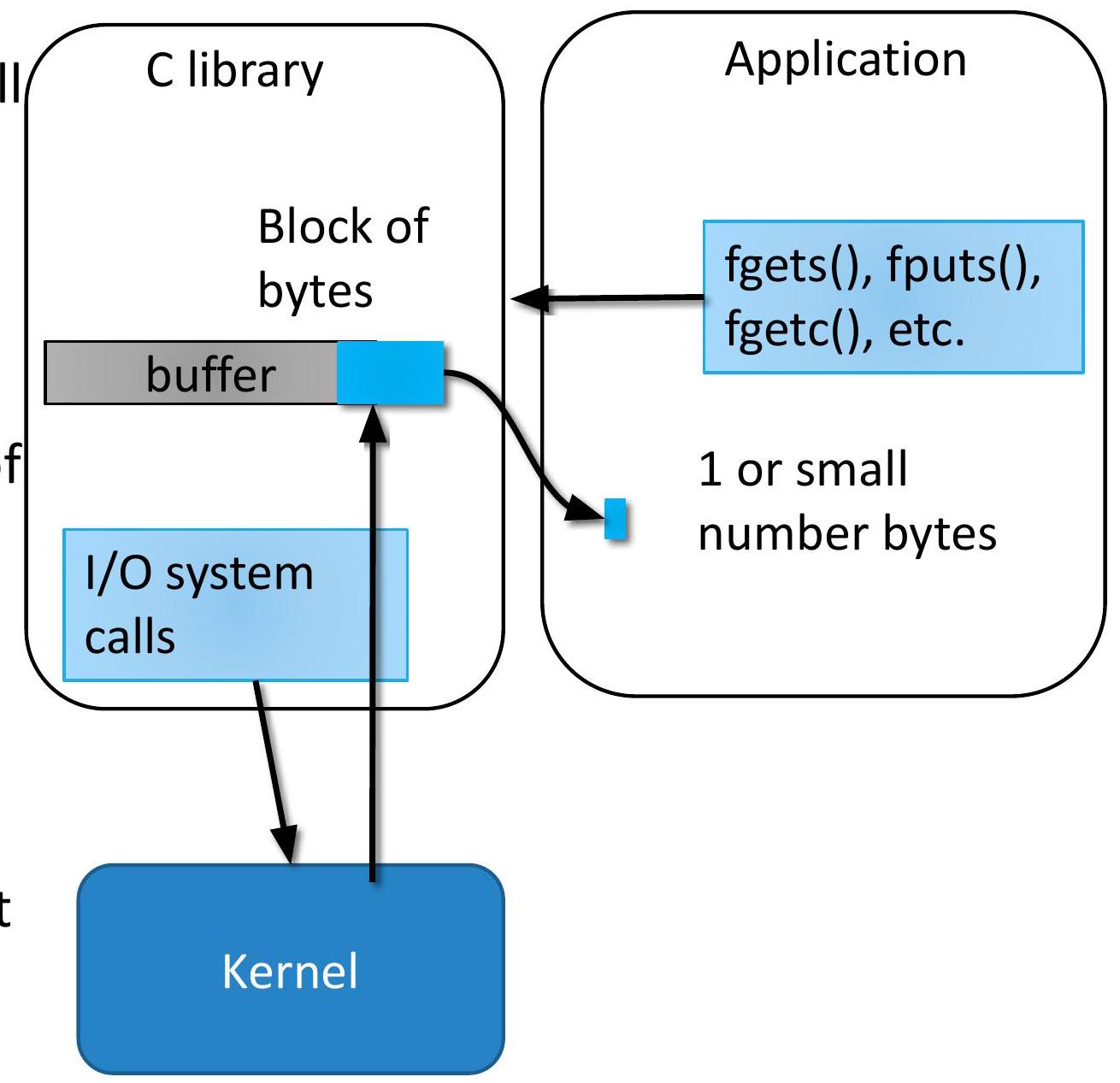
“缓冲区”中来组合这些操作。
40 缓冲 类型
- 完全(块)缓冲
- 数据 存储在 缓冲区 中,当 缓冲区 满时发生刷新。
- 用于 文件 I/O 以优化大量数据传输
- 示例:写入文件。
- 行缓冲
- 数据 被 缓冲,直到遇到换行符 (\n) 或 缓冲区 满。
- 常见于 交互式 I/O,如终端。
- 示例:printf() 到终端中的 标准输出。
- 无缓冲
- 无 缓冲;数据 立即发送/接收。
- 适用于错误消息或 实时 I/O。
- 示例:默认情况下是 标准错误。